copilot-cli-for-beginners

如果 AI 能找出你連問都不知道該問的 bug,會怎樣?
在本章中,GitHub Copilot CLI 將成為你的日常主力工具。你將在每天都要仰賴的工作流程中使用它:測試、重構、除錯和 Git。
🎯 學習目標
完成本章後,你將能夠:
- 使用 Copilot CLI 執行全面的程式碼審查
- 安全地重構遺留程式碼
- 在 AI 協助下除錯問題
- 自動生成測試
- 將 Copilot CLI 整合到你的 git 工作流程中
⏱️ 預估時間:約 60 分鐘(閱讀 15 分鐘 + 實作 45 分鐘)
🧩 現實生活類比:木匠的工作流程
木匠不只是知道如何使用工具,他們對不同工作有不同的工作流程:

同樣地,開發者對不同任務有不同的工作流程。GitHub Copilot CLI 強化了這些工作流程,讓你在日常編程任務中更有效率。
五大工作流程

以下每個工作流程都是自成一體的。選擇符合你當前需求的,或全部逐一完成。
自選冒險
本章涵蓋開發者通常使用的五種工作流程。不過你不需要一次全部閱讀! 每個工作流程都在下方的可折疊區塊中獨立呈現。選擇最符合你需求、最適合你目前專案的項目,其他的可以之後再回來探索。

| 我想要… | 跳至 |
|---|---|
| 在合併前審查程式碼 | 工作流程一:程式碼審查 |
| 整理混亂或遺留的程式碼 | 工作流程二:重構 |
| 追蹤並修復一個 bug | 工作流程三:除錯 |
| 為我的程式碼生成測試 | 工作流程四:測試生成 |
| 撰寫更好的提交訊息和 PR | 工作流程五:Git 整合 |
| 寫程式前先研究 | 快速提示:規劃或寫程式前先研究 |
| 看一個完整的 bug 修復工作流程 | 綜合應用:Bug 修復工作流程 |
點擊下方的工作流程展開,看看 GitHub Copilot CLI 如何在該領域強化你的開發流程。
工作流程一:程式碼審查 - 審查檔案、使用 /review agent、建立嚴重性檢查清單
 ### 基本審查
此範例使用 `@` 符號參照檔案,讓 Copilot CLI 直接取得其內容進行審查。
```bash
copilot
> Review @samples/book-app-project/book_app.py for code quality
```
---
### 基本審查
此範例使用 `@` 符號參照檔案,讓 Copilot CLI 直接取得其內容進行審查。
```bash
copilot
> Review @samples/book-app-project/book_app.py for code quality
```
---
🎬 看看實際效果!
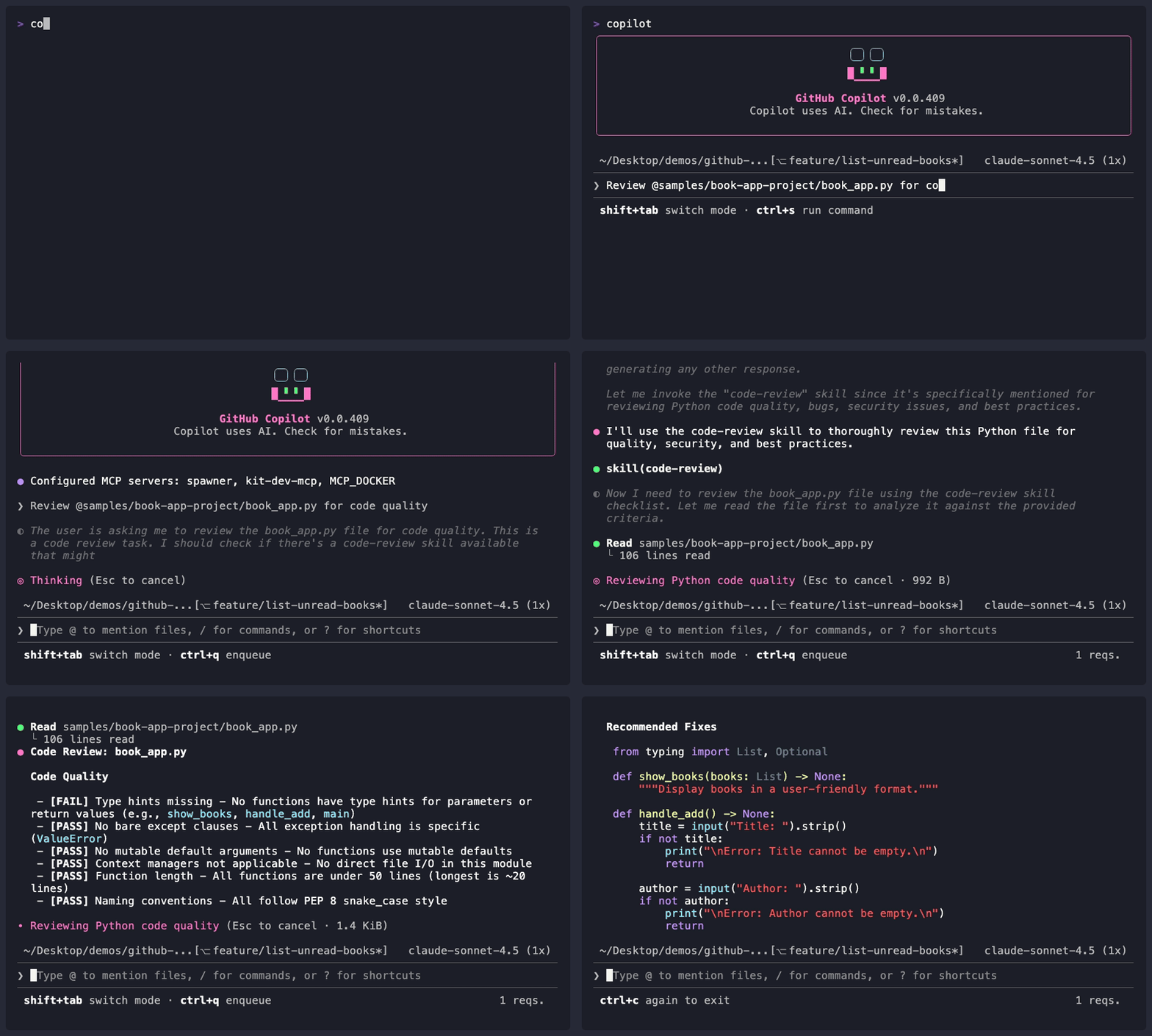 *示範輸出僅供參考,你的模型、工具與回應內容可能與此不同。*工作流程二:重構 - 重整程式碼結構、分離關注點、改善錯誤處理
 ### 簡單重構
> **先試試這個:** `@samples/book-app-project/book_app.py The command handling uses if/elif chains. Refactor it to use a dictionary dispatch pattern.`
從直接的改善開始。在書籍應用程式上嘗試這些提示。每個提示都使用 `@` 檔案參照搭配具體的重構指示,讓 Copilot CLI 確切知道要改什麼。
```bash
copilot
> @samples/book-app-project/book_app.py The command handling uses if/elif chains. Refactor it to use a dictionary dispatch pattern.
> @samples/book-app-project/utils.py Add type hints to all functions
> @samples/book-app-project/book_app.py Extract the book display logic into utils.py for better separation of concerns
```
> 💡 **重構新手?** 從簡單的請求開始,例如新增型別提示或改善變數名稱,再處理複雜的轉換。
---
### 簡單重構
> **先試試這個:** `@samples/book-app-project/book_app.py The command handling uses if/elif chains. Refactor it to use a dictionary dispatch pattern.`
從直接的改善開始。在書籍應用程式上嘗試這些提示。每個提示都使用 `@` 檔案參照搭配具體的重構指示,讓 Copilot CLI 確切知道要改什麼。
```bash
copilot
> @samples/book-app-project/book_app.py The command handling uses if/elif chains. Refactor it to use a dictionary dispatch pattern.
> @samples/book-app-project/utils.py Add type hints to all functions
> @samples/book-app-project/book_app.py Extract the book display logic into utils.py for better separation of concerns
```
> 💡 **重構新手?** 從簡單的請求開始,例如新增型別提示或改善變數名稱,再處理複雜的轉換。
---
🎬 看看實際效果!
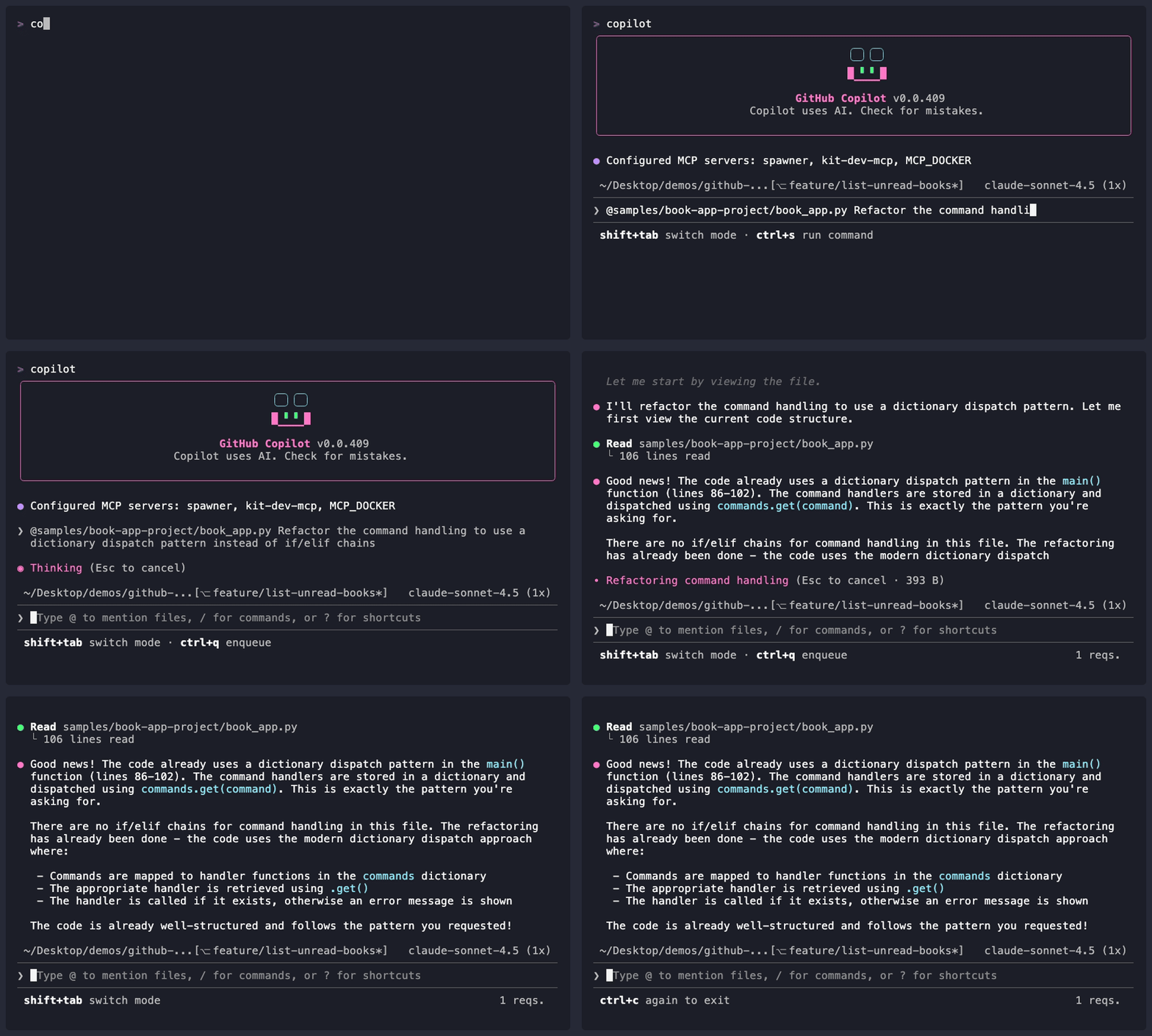 *示範輸出僅供參考,你的模型、工具與回應內容可能與此不同。*工作流程三:除錯 - 追蹤 bug、安全性稽核、跨檔案追蹤問題
 ### 簡單除錯
> **先試試這個:** `@samples/book-app-buggy/books_buggy.py Users report that searching for "The Hobbit" returns no results even though it's in the data. Debug why.`
從描述問題開始。以下是你可以在有 bug 的書籍應用程式上嘗試的常見除錯模式。每個提示都將 `@` 檔案參照與清晰的症狀描述搭配,讓 Copilot CLI 能夠定位並診斷 bug。
```bash
copilot
# 模式:「預期 X,但得到 Y」
> @samples/book-app-buggy/books_buggy.py Users report that searching for "The Hobbit" returns no results even though it's in the data. Debug why.
# 模式:「意外的行為」
> @samples/book-app-buggy/book_app_buggy.py When I remove a book that doesn't exist, the app says it was removed. Help me find why.
# 模式:「錯誤的結果」
> @samples/book-app-buggy/books_buggy.py When I mark one book as read, ALL books get marked. What's the bug?
```
> 💡 **除錯技巧**:描述*症狀*(你看到的)和*預期*(應該發生的)。Copilot CLI 會搞定其餘的。
---
### 簡單除錯
> **先試試這個:** `@samples/book-app-buggy/books_buggy.py Users report that searching for "The Hobbit" returns no results even though it's in the data. Debug why.`
從描述問題開始。以下是你可以在有 bug 的書籍應用程式上嘗試的常見除錯模式。每個提示都將 `@` 檔案參照與清晰的症狀描述搭配,讓 Copilot CLI 能夠定位並診斷 bug。
```bash
copilot
# 模式:「預期 X,但得到 Y」
> @samples/book-app-buggy/books_buggy.py Users report that searching for "The Hobbit" returns no results even though it's in the data. Debug why.
# 模式:「意外的行為」
> @samples/book-app-buggy/book_app_buggy.py When I remove a book that doesn't exist, the app says it was removed. Help me find why.
# 模式:「錯誤的結果」
> @samples/book-app-buggy/books_buggy.py When I mark one book as read, ALL books get marked. What's the bug?
```
> 💡 **除錯技巧**:描述*症狀*(你看到的)和*預期*(應該發生的)。Copilot CLI 會搞定其餘的。
---
🎬 看看實際效果!
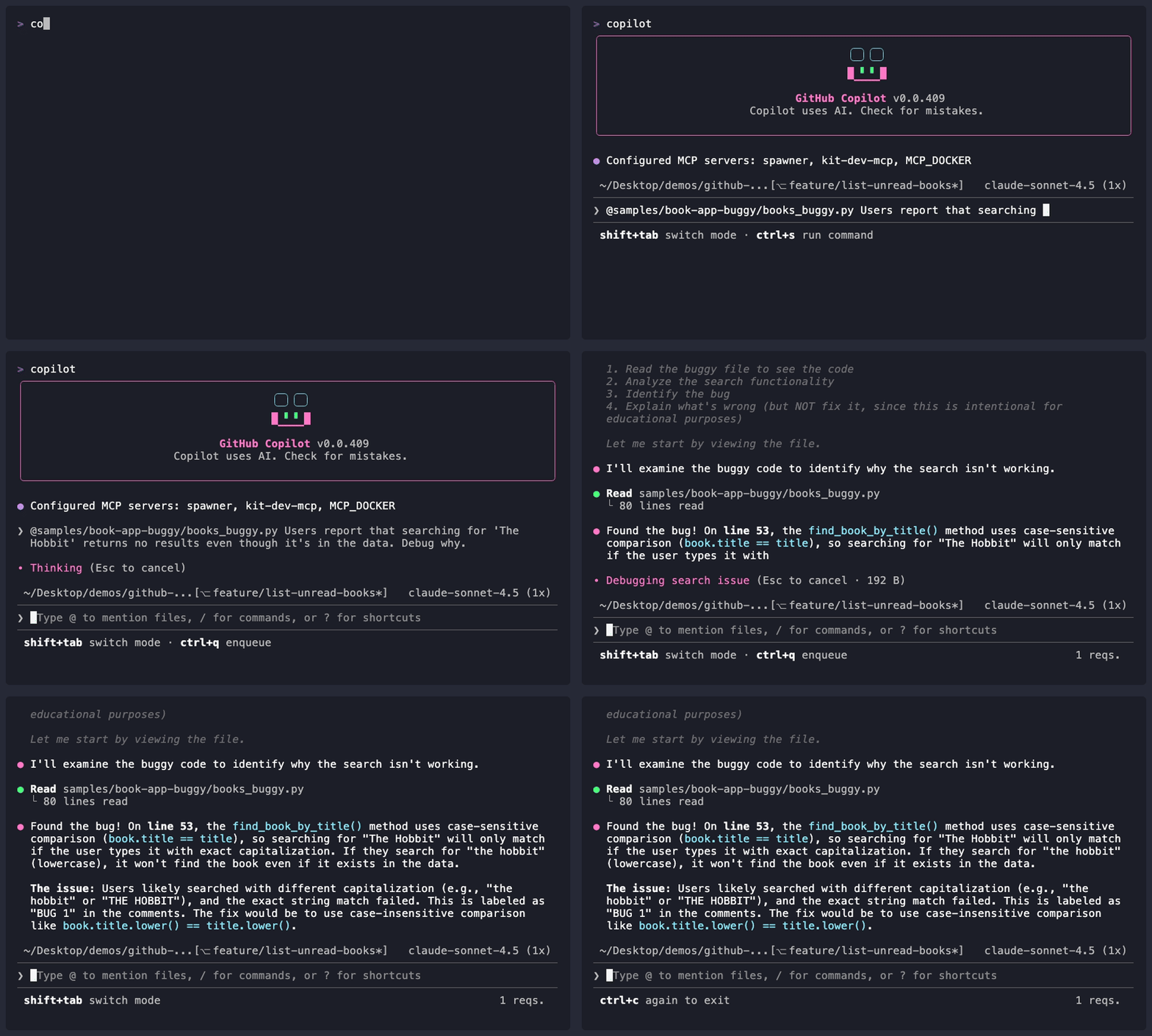 *示範輸出僅供參考,你的模型、工具與回應內容可能與此不同。*工作流程四:測試生成 - 自動生成全面的測試和邊界案例
 > **先試試這個:** `@samples/book-app-project/books.py Generate pytest tests for all functions including edge cases`
### 「測試爆炸」——2 個測試 vs 15+ 個測試
開發者手動撰寫測試時,通常會建立 2-3 個基本測試:
- 測試有效輸入
- 測試無效輸入
- 測試一個邊界案例
看看請 Copilot CLI 生成全面測試時會發生什麼!這個提示使用結構化的條列清單搭配 `@` 檔案參照,引導 Copilot CLI 提供完整的測試覆蓋:
```bash
copilot
> @samples/book-app-project/books.py Generate comprehensive pytest tests. Include tests for:
> - Adding books
> - Removing books
> - Finding by title
> - Finding by author
> - Marking as read
> - Edge cases with empty data
```
---
> **先試試這個:** `@samples/book-app-project/books.py Generate pytest tests for all functions including edge cases`
### 「測試爆炸」——2 個測試 vs 15+ 個測試
開發者手動撰寫測試時,通常會建立 2-3 個基本測試:
- 測試有效輸入
- 測試無效輸入
- 測試一個邊界案例
看看請 Copilot CLI 生成全面測試時會發生什麼!這個提示使用結構化的條列清單搭配 `@` 檔案參照,引導 Copilot CLI 提供完整的測試覆蓋:
```bash
copilot
> @samples/book-app-project/books.py Generate comprehensive pytest tests. Include tests for:
> - Adding books
> - Removing books
> - Finding by title
> - Finding by author
> - Marking as read
> - Edge cases with empty data
```
---
🎬 看看實際效果!
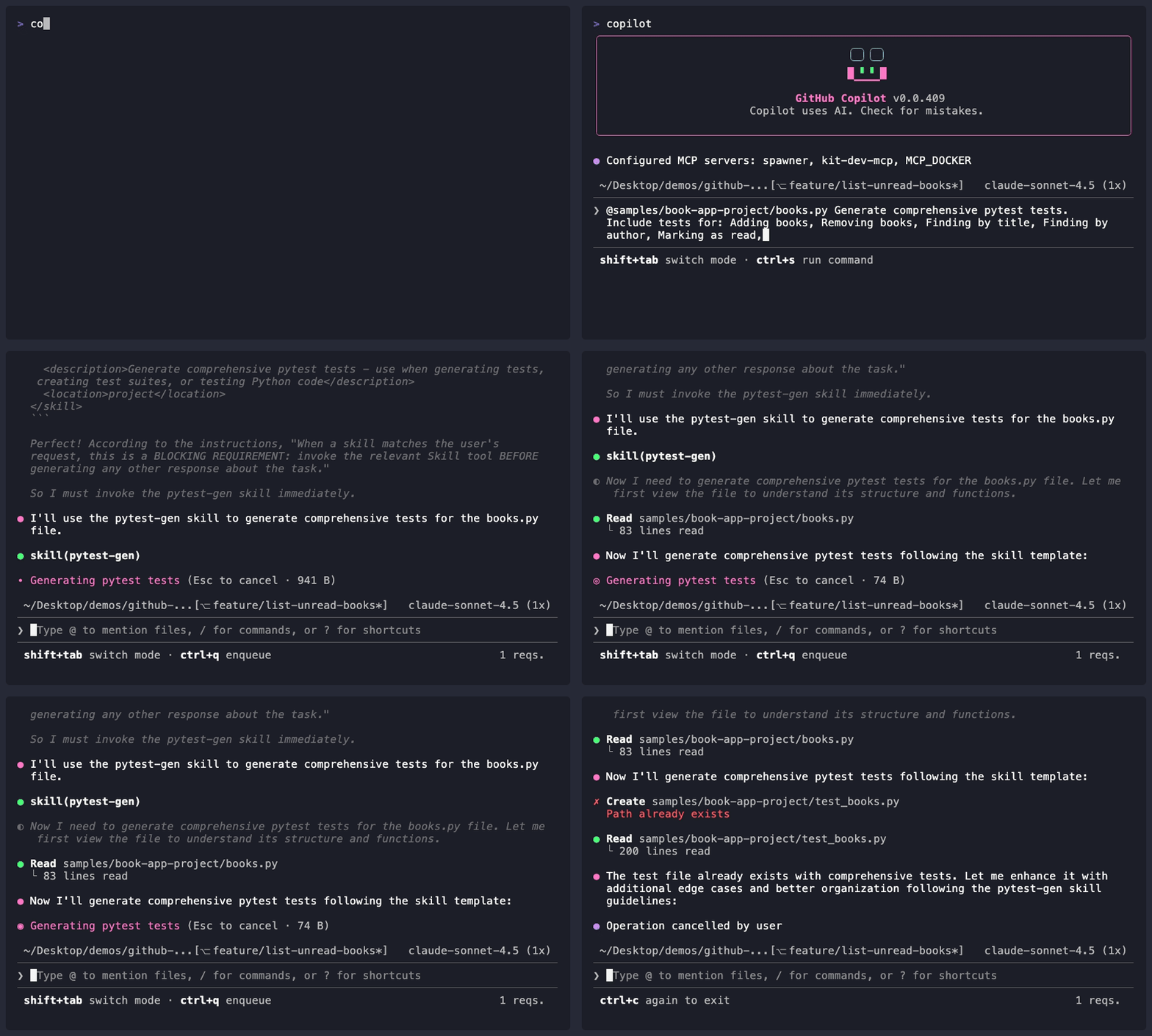 *示範輸出僅供參考,你的模型、工具與回應內容可能與此不同。*工作流程五:Git 整合 - 提交訊息、PR 描述、/delegate 和 /diff
 > 💡 **此工作流程假設你具備基本 git 操作知識**(暫存、提交、分支)。若你剛接觸 git,請先試試其他四個工作流程。
### 生成提交訊息
> **先試試這個:** `copilot -p "Generate a conventional commit message for: $(git diff --staged)"` — 暫存一些變更,然後執行這個指令看 Copilot CLI 為你撰寫提交訊息。
此範例使用 `-p` 內聯提示旗標搭配 shell 指令替換,將 `git diff` 輸出直接傳入 Copilot CLI,一次性生成提交訊息。`$(...)` 語法會執行括號內的指令並將其輸出插入外層指令。
```bash
# 查看變更內容
git diff --staged
# 使用[慣例提交](/GLOSSARY.html#conventional-commit)格式生成提交訊息
# (結構化訊息如「feat(books): add search」或「fix(data): handle empty input」)
copilot -p "Generate a conventional commit message for: $(git diff --staged)"
# 輸出:「feat(books): add partial author name search
#
# - Update find_by_author to support partial matches
# - Add case-insensitive comparison
# - Improve user experience when searching authors」
```
---
> 💡 **此工作流程假設你具備基本 git 操作知識**(暫存、提交、分支)。若你剛接觸 git,請先試試其他四個工作流程。
### 生成提交訊息
> **先試試這個:** `copilot -p "Generate a conventional commit message for: $(git diff --staged)"` — 暫存一些變更,然後執行這個指令看 Copilot CLI 為你撰寫提交訊息。
此範例使用 `-p` 內聯提示旗標搭配 shell 指令替換,將 `git diff` 輸出直接傳入 Copilot CLI,一次性生成提交訊息。`$(...)` 語法會執行括號內的指令並將其輸出插入外層指令。
```bash
# 查看變更內容
git diff --staged
# 使用[慣例提交](/GLOSSARY.html#conventional-commit)格式生成提交訊息
# (結構化訊息如「feat(books): add search」或「fix(data): handle empty input」)
copilot -p "Generate a conventional commit message for: $(git diff --staged)"
# 輸出:「feat(books): add partial author name search
#
# - Update find_by_author to support partial matches
# - Add case-insensitive comparison
# - Improve user experience when searching authors」
```
---
🎬 看看實際效果!
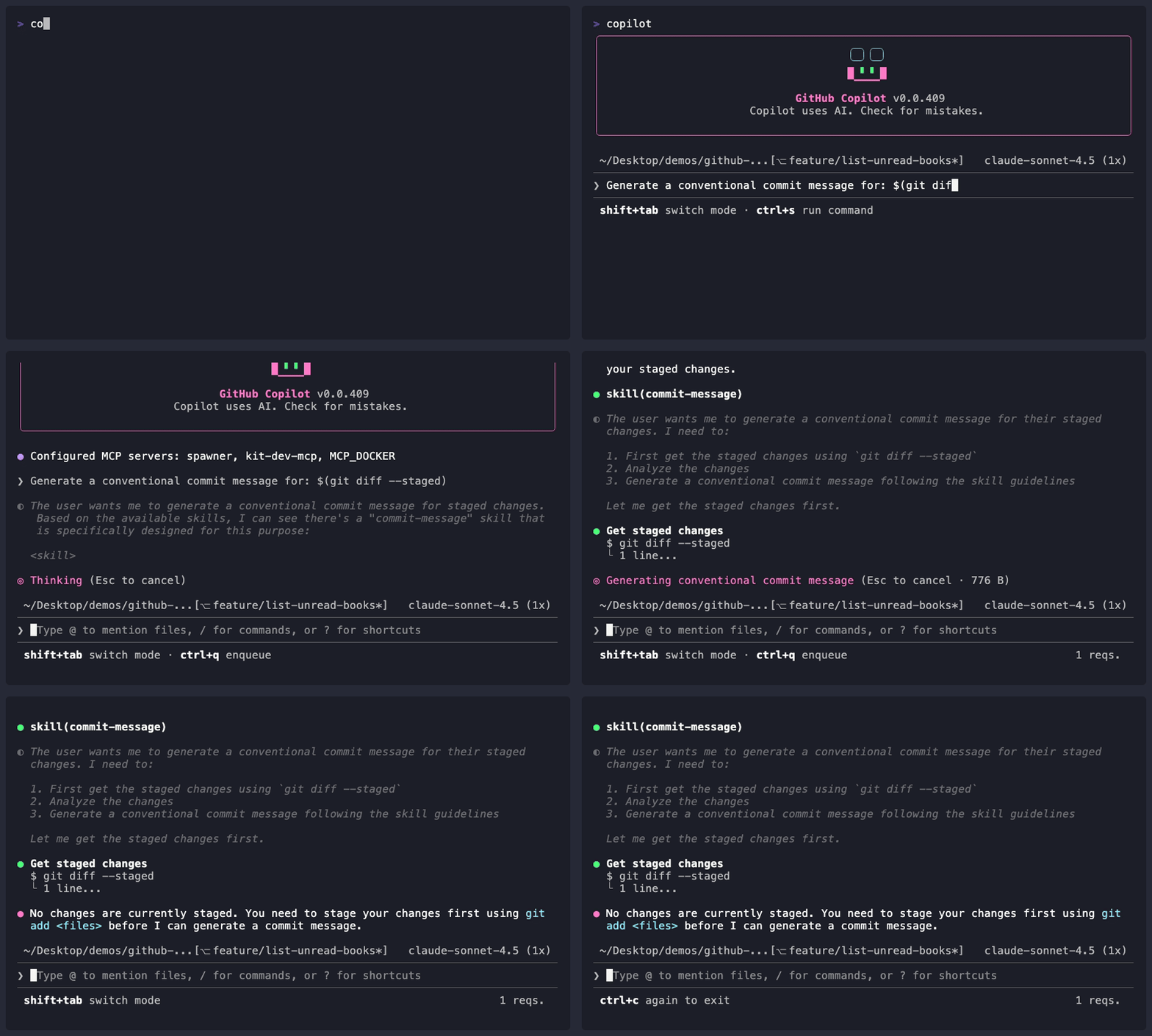 *示範輸出僅供參考,你的模型、工具與回應內容可能與此不同。*快速提示:規劃或寫程式前先研究
當你需要調查某個函式庫、了解最佳實踐或探索陌生主題時,在撰寫任何程式碼前先使用 /research 執行深度研究:
copilot

> /research What are the best Python libraries for validating user input in CLI apps?
Copilot 搜尋 GitHub 儲存庫和網路資源,然後返回有來源參考的摘要。當你即將開始一個新功能並想先做出明智決定時,這非常有用。你可以使用 /share 分享結果。
💡 提示:
/research在/plan之前效果很好——先研究方法,再規劃實作。
綜合應用:Bug 修復工作流程
以下是修復一個回報 bug 的完整工作流程:
# 1. 理解 bug 回報
copilot

> Users report: 'Finding books by author name doesn't work for partial names'
> @samples/book-app-project/books.py Analyze and identify the likely cause

# 2. 除錯問題(在同一工作階段中繼續)
> Based on the analysis, show me the find_by_author function and explain the issue

> Fix the find_by_author function to handle partial name matches

# 3. 為修復生成測試
> @samples/book-app-project/books.py Generate pytest tests specifically for:
> - Full author name match
> - Partial author name match
> - Case-insensitive matching
> - Author name not found

# 4. 生成提交訊息
copilot -p "Generate commit message for: $(git diff --staged)"

# 輸出:「fix(books): support partial author name search」
Bug 修復工作流程摘要
| 步驟 | 操作 | Copilot 指令 |
|---|---|---|
| 1 | 理解 bug | > [描述 bug] @relevant-file.py Analyze the likely cause |
| 2 | 取得詳細分析 | > Show me the function and explain the issue |
| 3 | 實作修復 | > Fix the [specific issue] |
| 4 | 生成測試 | > Generate tests for [specific scenarios] |
| 5 | 提交 | copilot -p "Generate commit message for: $(git diff --staged)" |
實作練習

現在輪到你應用這些工作流程了。
▶️ 自行嘗試
完成示範後,試試這些變化:
-
Bug 偵探挑戰:請 Copilot CLI 除錯
samples/book-app-buggy/books_buggy.py中的mark_as_read函式。它有解釋為何該函式將所有書籍都標記為已讀而不是只標記一本嗎? -
測試挑戰:為書籍應用程式中的
add_book函式生成測試。數一數 Copilot CLI 包含了多少你不會想到的邊界案例。 -
提交訊息挑戰:對書籍應用程式的任一檔案做一個小變更,暫存它(
git add .),然後執行:copilot -p "Generate a conventional commit message for: $(git diff --staged)"這個訊息比你快速寫的更好嗎?
自我檢驗:當你能解釋為何「debug this bug」比「find bugs」更強大(上下文很重要!)時,你就理解了開發工作流程。
📝 作業
主要挑戰:重構、測試並交付
實作範例專注於 find_book_by_title 和程式碼審查。現在在 book-app-project 的不同函式上練習相同的工作流程技能:
- 審查:請 Copilot CLI 審查
books.py中的remove_book()是否有邊界案例和潛在問題:@samples/book-app-project/books.py Review the remove_book() function. What happens if the title partially matches another book (e.g., "Dune" vs "Dune Messiah")? Are there any edge cases not handled? - 重構:請 Copilot CLI 改善
remove_book(),處理如大小寫不敏感比對等邊界案例,並在找不到書籍時返回有用的回饋 - 測試:專門為改善後的
remove_book()函式生成 pytest 測試,涵蓋:- 移除存在的書籍
- 大小寫不敏感的書名比對
- 不存在的書籍返回適當的回饋
- 從空集合中移除
- 審查:暫存你的變更並執行
/review檢查是否有剩餘問題 - 提交:生成慣例提交訊息:
copilot -p "Generate a conventional commit message for: $(git diff --staged)"
💡 提示(點擊展開)
**每個步驟的範例提示:** ```bash copilot # 步驟一:審查 > @samples/book-app-project/books.py Review the remove_book() function. What edge cases are not handled? # 步驟二:重構 > Improve remove_book() to use case-insensitive matching and return a clear message when the book isn't found. Show me the before and after code. # 步驟三:測試 > Generate pytest tests for the improved remove_book() function, including: > - Removing a book that exists > - Case-insensitive matching ("dune" should remove "Dune") > - Book not found returns appropriate response > - Removing from an empty collection # 步驟四:審查 > /review # 步驟五:提交 > Generate a conventional commit message for this refactor ``` **提示:** 改善 `remove_book()` 後,試著問 Copilot CLI:「Are there any other functions in this file that could benefit from the same improvements?」。它可能會建議對 `find_book_by_title()` 或 `find_by_author()` 做類似的改動。加分挑戰:用 Copilot CLI 建立應用程式
💡 備註:這個 GitHub Skills 練習使用 Node.js 而非 Python。你將練習的 GitHub Copilot CLI 技術——建立 issue、生成程式碼和在終端機中協作——適用於任何語言。
這個練習向開發者展示如何使用 GitHub Copilot CLI 在建立 Node.js 計算機應用程式的過程中,從終端機建立 issue、生成程式碼並進行協作。你將安裝 CLI、使用範本和 agent,並練習迭代式、命令列驅動的開發。
 開始「使用 Copilot CLI 建立應用程式」Skills 練習
🔧 常見錯誤與疑難排解(點擊展開)
### 常見錯誤 | 錯誤 | 發生的事 | 解決方式 | |------|---------|---------| | 使用模糊的提示如「Review this code」 | 回饋籠統,遺漏具體問題 | 更精確:「Review for SQL injection, XSS, and auth issues」 | | 不使用 `/review` 進行程式碼審查 | 錯過最佳化的程式碼審查 agent | 使用 `/review`,它專門調整為高訊噪比輸出 | | 沒有上下文地請求「find bugs」 | Copilot CLI 不知道你遇到了什麼 bug | 描述症狀:「Users report X happens when Y」 | | 生成測試時不指定框架 | 測試可能使用錯誤的語法或斷言函式庫 | 指定:「Generate tests using Jest」或「using pytest」 | ### 疑難排解 **審查似乎不完整** - 更具體地說明要找什麼: ```bash copilot # 不要這樣: > Review @samples/book-app-project/book_app.py # 改成這樣: > Review @samples/book-app-project/book_app.py for input validation, error handling, and edge cases ``` **測試不符合我的框架** - 指定框架: ```bash copilot > @samples/book-app-project/books.py Generate tests using pytest (not unittest) ``` **重構後行為改變** - 請 Copilot CLI 保留行為: ```bash copilot > @samples/book-app-project/book_app.py Refactor command handling to use dictionary dispatch. IMPORTANT: Maintain identical external behavior - no breaking changes ```摘要
🔑 重點整理

- 程式碼審查透過具體的提示變得全面
- 重構在先生成測試後更安全
- 除錯在同時向 Copilot CLI 展示錯誤訊息和程式碼時更有效
- 測試生成應該包含邊界案例和錯誤情境
- Git 整合自動化提交訊息和 PR 描述
📋 快速參考:查看 GitHub Copilot CLI 指令參考 以取得完整指令與快捷鍵列表。
✅ 檢查點:你已掌握核心技能
恭喜! 你現在具備了使用 GitHub Copilot CLI 高效工作所需的所有核心技能:
| 技能 | 章節 | 你現在能夠… |
|---|---|---|
| 基本指令 | 第 01 章 | 使用互動模式、計畫模式、程式化模式(-p)和斜線指令 |
| 上下文 | 第 02 章 | 以 @ 參照檔案、管理工作階段、理解上下文視窗 |
| 工作流程 | 第 03 章 | 審查程式碼、重構、除錯、生成測試、整合 git |
第 04-06 章涵蓋更多附加功能,同樣值得學習。
🛠️ 建立你的個人工作流程
使用 GitHub Copilot CLI 沒有單一「正確」的方式。以下是你發展自己模式時的一些建議:
📚 官方文件:Copilot CLI 最佳實踐 — 來自 GitHub 的推薦工作流程與技巧。
- 對任何非瑣碎的事情先用
/plan。在執行前細化計畫——好的計畫帶來更好的結果。 - 儲存效果好的提示。 當 Copilot CLI 出錯時,記下哪裡出了問題。隨著時間累積,這會成為你的個人操作手冊。
- 自由實驗。 有些開發者喜歡長而詳細的提示,有些則喜歡簡短提示搭配後續追問。嘗試不同的方式,注意哪種感覺最自然。
💡 即將到來:在第 04 和 05 章中,你將學習如何將最佳實踐編碼成自訂指示和 skill,讓 Copilot CLI 自動載入。
➡️ 接下來
其餘章節涵蓋擴展 Copilot CLI 能力的附加功能:
| 章節 | 涵蓋內容 | 適合情境 |
|---|---|---|
| 第 04 章:Agent | 建立專屬的 AI 角色 | 當你需要領域專家(前端、安全性)時 |
| 第 05 章:Skill | 自動載入任務指示 | 當你重複使用相同的提示時 |
| 第 06 章:MCP | 連接外部服務 | 當你需要來自 GitHub、資料庫的即時資料時 |
建議:先將核心工作流程使用一週,然後在有特定需求時回來學習第 04-06 章。
繼續學習進階主題
在第 04 章:Agent 與自訂指示中,你將學習:
- 使用內建 agent(
/plan、/review) - 以
.agent.md檔案建立專屬 agent(前端專家、安全稽核員) - 多 agent 協作模式
- 專案標準的自訂指示檔案
| ← 回到第 02 章 | 繼續前往第 04 章 → |