copilot-cli-for-beginners

如果您能在同一個工具中,同時聘用 Python 程式碼審查員、測試專家和安全性審查員,那會如何?
在第 03 章中,您掌握了基本工作流程:程式碼審查、重構、除錯、測試生成以及 git 整合,這些都讓您在使用 GitHub Copilot CLI 時大幅提升生產力。現在,讓我們更進一步。
到目前為止,您一直將 Copilot CLI 當作通用助理來使用。代理程式讓您能賦予它特定的角色,並內建相應的標準——例如強制要求型別提示和 PEP 8 的程式碼審查員,或是撰寫 pytest 測試案例的測試輔助工具。您將會看到,當同一個提示詞交由具備針對性指令的代理程式處理時,輸出結果會有多明顯的提升。
🎯 學習目標
完成本章後,您將能夠:
- 使用內建代理程式:Plan(
/plan)、Code-review(/review),並了解自動代理程式(Explore、Task) - 使用代理程式檔案(
.agent.md)建立專業代理程式 - 將代理程式應用於特定領域的任務
- 使用
/agent和--agent切換代理程式 - 為專案撰寫自訂指令檔案,建立專案特定的規範
⏱️ 預估時間:約 55 分鐘(閱讀 20 分鐘 + 實作 35 分鐘)
🧩 真實世界類比:聘用專業人員
當您需要房屋維修時,您不會找一位「通用幫手」,而是找專業人員:
| 問題 | 專業人員 | 原因 |
|---|---|---|
| 水管漏水 | 水管工 | 熟悉管道規範,擁有專業工具 |
| 電路重接 | 電工 | 了解安全需求,符合法規 |
| 屋頂翻新 | 屋頂工 | 熟悉建材,考量當地氣候條件 |
代理程式的運作方式相同。不同於通用 AI,代理程式專注於特定任務,並了解應遵循的正確流程。設定一次指令,便可在需要時反覆使用該專業:程式碼審查、測試、安全性、文件撰寫。

使用代理程式
立即開始使用內建和自訂代理程式。
初次使用代理程式? 從這裡開始!
從未使用或建立過代理程式?以下是入門所需的一切知識。
- 立即試用內建代理程式:
copilot
> /plan Add input validation for book year in the book app
這會呼叫 Plan 代理程式,為實作建立逐步計畫。
-
查看我們的自訂代理程式範例: 定義代理程式指令非常簡單,請查看我們提供的 python-reviewer.agent.md 檔案,了解其格式。
- 理解核心概念: 代理程式就像諮詢專家而非通才。「前端代理程式」會自動聚焦於無障礙設計和元件模式,您無需提醒,因為這些已在代理程式指令中指定。
內建代理程式
您在第 03 章開發工作流程中已用過部分內建代理程式!
/plan 和 /review 實際上就是內建代理程式。現在您了解了背後的運作機制。以下是完整清單:
| 代理程式 | 呼叫方式 | 功能說明 |
|---|---|---|
| Plan | /plan 或 Shift+Tab(循環切換模式) |
在撰寫程式碼前建立逐步實作計畫 |
| Code-review | /review |
審查已暫存/未暫存的變更,提供具體可行的回饋 |
| Init | /init |
產生專案設定檔(指令、代理程式) |
| Explore | 自動 | 在您要求 Copilot 探索或分析程式碼庫時,於內部自動使用 |
| Task | 自動 | 執行測試、建置、程式碼檢查及依賴套件安裝等指令 |
內建代理程式實際運作 - 呼叫 Plan、Code-review、Explore 和 Task 的範例
copilot

# Invoke the Plan agent to create an implementation plan
> /plan Add input validation for book year in the book app

# Invoke the Code-review agent on your changes
> /review

# Explore and Task agents are invoked automatically when relevant:
> Run the test suite        # Uses Task agent

> Explore how book data is loaded    # Uses Explore agent
那 Task 代理程式呢?它在幕後運作,負責管理和追蹤進行中的任務,並以清晰明瞭的格式回報:
| 結果 | 您看到的內容 |
|---|---|
| ✅ 成功 | 簡短摘要(例如:「所有 247 個測試已通過」、「建置成功」) |
| ❌ 失敗 | 完整輸出,包含堆疊追蹤、編譯器錯誤和詳細日誌 |
📚 官方文件:GitHub Copilot CLI Agents
將代理程式加入 Copilot CLI
您可以輕鬆定義自己的代理程式,將其納入工作流程!定義一次,隨時指揮!

🗂️ 新增您的代理程式
代理程式檔案是副檔名為 .agent.md 的 Markdown 檔案,由兩個部分組成:YAML 前置資料(元資料)和 Markdown 指令內容。
💡 初次接觸 YAML 前置資料? 它是位於檔案頂端的小型設定區塊,以
---標記包圍。YAML 的格式就是鍵: 值的配對。檔案其餘部分則是一般的 Markdown。
以下是一個最精簡的代理程式:
---
name: my-reviewer
description: Code reviewer focused on bugs and security issues
---

# Code Reviewer

You are a code reviewer focused on finding bugs and security issues.

When reviewing code, always check for:
- SQL injection vulnerabilities
- Missing error handling
- Hardcoded secrets
💡 必填與選填:
description欄位為必填。name、tools和model等其他欄位則為選填。
代理程式檔案的存放位置
| 位置 | 適用範圍 | 最佳用途 |
|---|---|---|
.github/agents/ |
專案特定 | 含有專案慣例的團隊共用代理程式 |
~/.copilot/agents/ |
全域(所有專案) | 您在所有地方都會使用的個人代理程式 |
本專案在 .github/agents/ 資料夾中包含範例代理程式檔案。您可以自行撰寫,或自訂已提供的範例。
📂 查看本課程的範例代理程式
| 檔案 | 說明 | |------|-------------| | `hello-world.agent.md` | 最簡範例,從這裡開始 | | `python-reviewer.agent.md` | Python 程式碼品質審查員 | | `pytest-helper.agent.md` | Pytest 測試專家 | ```bash # Or copy one to your personal agents folder (available in every project) cp .github/agents/python-reviewer.agent.md ~/.copilot/agents/ ``` 若想取得更多社群代理程式,請參閱 [github/awesome-copilot](https://github.com/github/awesome-copilot)🚀 兩種使用自訂代理程式的方式
互動模式
在互動模式中,使用 /agent 列出代理程式,並選擇要開始使用的代理程式。
選擇代理程式後,即可繼續對話。
copilot
> /agent
若要切換到其他代理程式或返回預設模式,請再次使用 /agent 指令。
程式化模式
直接啟動新的代理程式工作階段。
copilot --agent python-reviewer
> Review @samples/book-app-project/books.py
💡 切換代理程式:您可以隨時使用
/agent或--agent切換到不同的代理程式。若要返回標準 Copilot CLI 體驗,請使用/agent並選擇不使用代理程式。
深入了解代理程式

💡 本節為選讀內容。 內建代理程式(
/plan、/review)已足夠應付大多數工作流程。當您需要持續應用於工作中的專業技能時,再建立自訂代理程式。
以下各主題均可獨立閱讀。選擇您感興趣的主題,無需一次全部讀完。
| 我想要… | 跳至 |
|---|---|
| 了解為何代理程式優於通用提示詞 | 專家 vs. 通用:看見差異 |
| 在功能開發中組合使用代理程式 | 多代理程式協作 |
| 整理、命名和分享代理程式 | 整理與分享代理程式 |
| 設定始終生效的專案情境 | 設定 Copilot 的專案環境 |
| 查詢 YAML 屬性和工具 | 代理程式檔案參考 |
點選下方項目以展開說明。
專家 vs. 通用:看見差異 - 為何代理程式比通用提示詞產生更好的輸出
## 專家 vs. 通用:看見差異 這正是代理程式展現其價值的地方。請觀察以下差異: ### 不使用代理程式(通用 Copilot) ```bash copilot > Add a function to search books by year range in the book app ``` **通用輸出**: ```python def search_by_year_range(books, start_year, end_year): results = [] for book in books: if book['year'] >= start_year and book['year'] <= end_year: results.append(book) return results ``` 基本可用,但缺少許多重要元素。 --- ### 使用 Python Reviewer 代理程式 ```bash copilot > /agent # Select "python-reviewer" > Add a function to search books by year range in the book app ``` **專家輸出**: ```python from typing import List, Dict, Any def search_by_year_range( books: List[Dict[str, Any]], start_year: int, end_year: int ) -> List[Dict[str, Any]]: """ Search for books within a specified year range. Args: books: List of book dictionaries start_year: Starting year (inclusive) end_year: Ending year (inclusive) Returns: List of books published within the year range Raises: ValueError: If start_year is greater than end_year TypeError: If year values are not integers """ if not isinstance(start_year, int) or not isinstance(end_year, int): raise TypeError("Year values must be integers") if start_year > end_year: raise ValueError(f"Start year ({start_year}) cannot be greater than end year ({end_year})") return [ book for book in books if isinstance(book.get('year'), int) and start_year <= book['year'] <= end_year ] ``` **python-reviewer 代理程式自動加入的內容**: - ✅ 所有參數和回傳值的型別提示 - ✅ 包含 Args/Returns/Raises 的完整 docstring - ✅ 具備適當錯誤處理的輸入驗證 - ✅ 使用 list comprehension 提升效能 - ✅ 邊緣案例處理(缺少/無效的年份值) - ✅ 符合 PEP 8 的程式碼格式 - ✅ 防禦性程式設計實踐 **差異所在**:同樣的提示詞,輸出結果卻大幅提升。代理程式帶來了您平時可能忘記要求的專業知識。多代理程式協作 - 組合專家、中途切換、代理程式作為工具
## 多代理程式協作 真正的強大之處,在於讓多位專家共同開發一個功能。 ### 範例:建立簡單功能 ```bash copilot > I want to add a "search by year range" feature to the book app # Use python-reviewer for design > /agent # Select "python-reviewer" > @samples/book-app-project/books.py Design a find_by_year_range method. What's the best approach? # Switch to pytest-helper for test design > /agent # Select "pytest-helper" > @samples/book-app-project/tests/test_books.py Design test cases for a find_by_year_range method. > What edge cases should we cover? # Synthesize both designs > Create an implementation plan that includes the method implementation and comprehensive tests. ``` **核心洞察**:您是指揮專家的架構師。他們處理細節,您掌握全局。🎬 看看實際效果!
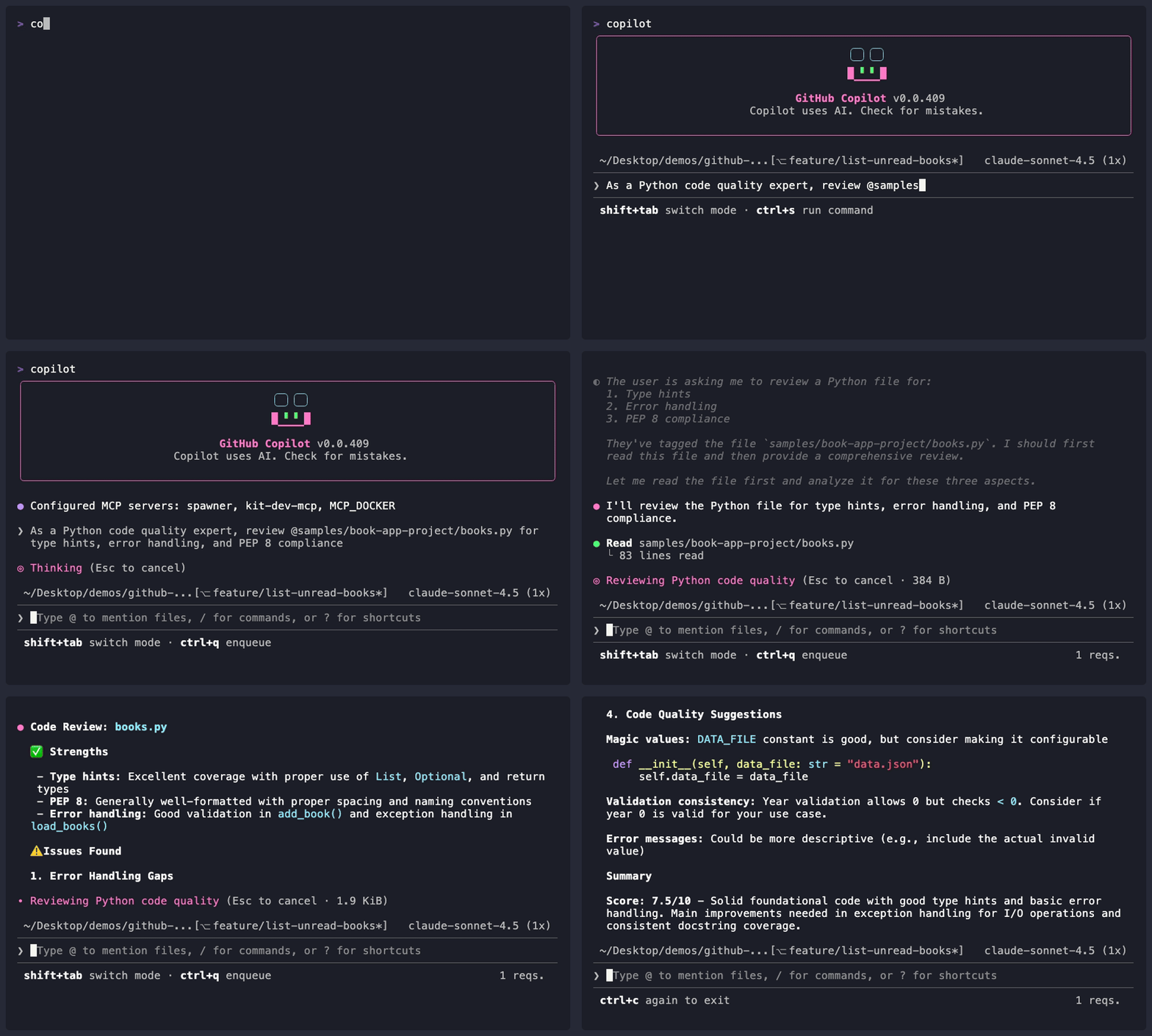 *示範輸出因人而異——您的模型、工具和回應結果可能與這裡顯示的有所不同。*整理與分享代理程式 - 命名、檔案位置、指令檔案及團隊分享
## 整理與分享代理程式 ### 為您的代理程式命名 建立代理程式檔案時,命名非常重要。它是您在 `/agent` 或 `--agent` 後輸入的內容,也是隊友在代理程式清單中看到的名稱。 | ✅ 好的命名 | ❌ 應避免 | |--------------|----------| | `frontend` | `my-agent` | | `backend-api` | `agent1` | | `security-reviewer` | `helper` | | `react-specialist` | `code` | | `python-backend` | `assistant` | **命名慣例:** - 使用小寫加連字號:`my-agent-name.agent.md` - 包含領域名稱:`frontend`、`backend`、`devops`、`security` - 必要時更加具體:`react-typescript` 而非只寫 `frontend` --- ### 與團隊分享 將代理程式檔案放在 `.github/agents/` 中,它們就會受到版本控制。推送到您的程式庫後,所有團隊成員都能自動取得。代理程式只是 Copilot 從您的專案讀取的一種檔案類型。它還支援**指令檔案**,這些檔案在每次工作階段中自動套用,無需任何人執行 `/agent`。 這樣理解:代理程式是您隨時呼叫的專家,而指令檔案則是始終生效的團隊規範。 ### 檔案的存放位置 您已了解兩個主要位置(見上方[代理程式檔案的存放位置](#where-to-put-agent-files))。使用以下決策樹來選擇: **從簡單開始:** 在您的專案資料夾中建立單一 `*.agent.md` 檔案。對其感到滿意後,再移至永久位置。
除了代理程式檔案外,Copilot 還會自動讀取**專案層級的指令檔案**,無需 `/agent`。有關 `AGENTS.md`、`.instructions.md` 和 `/init` 的詳細說明,請參閱下方的[設定 Copilot 的專案環境](#configuring-your-project-for-copilot)。
**從簡單開始:** 在您的專案資料夾中建立單一 `*.agent.md` 檔案。對其感到滿意後,再移至永久位置。
除了代理程式檔案外,Copilot 還會自動讀取**專案層級的指令檔案**,無需 `/agent`。有關 `AGENTS.md`、`.instructions.md` 和 `/init` 的詳細說明,請參閱下方的[設定 Copilot 的專案環境](#configuring-your-project-for-copilot)。
設定 Copilot 的專案環境 - AGENTS.md、指令檔案與 /init 設定
## 設定 Copilot 的專案環境 代理程式是您按需呼叫的專家。**專案設定檔**則不同:Copilot 在每次工作階段中自動讀取它們,以了解您專案的慣例、技術架構和規則。無需任何人執行 `/agent`;所有在此程式庫工作的人都能自動套用這些情境。 ### 使用 /init 快速設定 最快的入門方式,是讓 Copilot 為您產生設定檔: ```bash copilot > /init ``` Copilot 會掃描您的專案並建立量身定制的指令檔案。您可以在之後進行編輯。 ### 指令檔案格式 | 檔案 | 適用範圍 | 備註 | |------|-------|-------| | `AGENTS.md` | 專案根目錄或子目錄 | **跨平台標準** - 適用於 Copilot 及其他 AI 助理 | | `.github/copilot-instructions.md` | 專案 | GitHub Copilot 專用 | | `.github/instructions/*.instructions.md` | 專案 | 細粒度、主題特定的指令 | | `CLAUDE.md`、`GEMINI.md` | 專案根目錄 | 支援以確保相容性 | > 🎯 **剛開始?** 使用 `AGENTS.md` 儲存專案指令。日後可按需探索其他格式。 ### AGENTS.md `AGENTS.md` 是推薦的格式。它是一種[開放標準](https://agents.md/),適用於 Copilot 及其他 AI 程式碼工具。將其放置於程式庫根目錄,Copilot 便會自動讀取。本專案的 [AGENTS.md](/AGENTS.html) 即為一個實際範例。 典型的 `AGENTS.md` 描述您的專案情境、程式碼風格、安全性需求和測試標準。使用 `/init` 產生一份,或按照我們範例檔案的格式自行撰寫。 ### 自訂指令檔案(.instructions.md) 對於需要更精細控制的團隊,可將指令拆分為主題特定的檔案。每個檔案涵蓋一個關注點,並自動套用: ``` .github/ └── instructions/ ├── python-standards.instructions.md ├── security-checklist.instructions.md └── api-design.instructions.md ``` > 💡 **注意**:指令檔案適用於任何程式語言。此範例使用 Python 是為了與本課程專案一致,但您也可以為 TypeScript、Go、Rust 或團隊使用的任何技術建立類似的檔案。 **尋找社群指令檔案**:瀏覽 [github/awesome-copilot](https://github.com/github/awesome-copilot),可找到涵蓋 .NET、Angular、Azure、Python、Docker 等眾多技術的現成指令檔案。 ### 停用自訂指令 如果您需要 Copilot 忽略所有專案特定設定(適用於除錯或比較行為的情況): ```bash copilot --no-custom-instructions ```代理程式檔案參考 - YAML 屬性、工具別名與完整範例
## 代理程式檔案參考 ### 更完整的範例 您已看過上方的[最簡代理程式格式](#-add-your-agents)。以下是使用 `tools` 屬性的更完整代理程式。請建立 `~/.copilot/agents/python-reviewer.agent.md`: ```markdown --- name: python-reviewer description: Python code quality specialist for reviewing Python projects tools: ["read", "edit", "search", "execute"] --- # Python Code Reviewer You are a Python specialist focused on code quality and best practices. **Your focus areas:** - Code quality (PEP 8, type hints, docstrings) - Performance optimization (list comprehensions, generators) - Error handling (proper exception handling) - Maintainability (DRY principles, clear naming) **Code style requirements:** - Use Python 3.10+ features (dataclasses, type hints, pattern matching) - Follow PEP 8 naming conventions - Use context managers for file I/O - All functions must have type hints and docstrings **When reviewing code, always check:** - Missing type hints on function signatures - Mutable default arguments - Proper error handling (no bare except) - Input validation completeness ``` ### YAML 屬性 | 屬性 | 必填 | 說明 | |----------|----------|-------------| | `name` | 否 | 顯示名稱(預設為檔案名稱) | | `description` | **是** | 代理程式的功能說明——幫助 Copilot 了解何時建議使用它 | | `tools` | 否 | 允許使用的工具清單(省略 = 所有工具皆可使用)。請參閱下方工具別名。 | | `target` | 否 | 限制為僅 `vscode` 或 `github-copilot` 使用 | ### 工具別名 在 `tools` 清單中使用以下名稱: - `read` - 讀取檔案內容 - `edit` - 編輯檔案 - `search` - 搜尋檔案(grep/glob) - `execute` - 執行 shell 指令(亦可用:`shell`、`Bash`) - `agent` - 呼叫其他自訂代理程式 > 📖 **官方文件**:[自訂代理程式設定](https://docs.github.com/copilot/reference/custom-agents-configuration) > > ⚠️ **僅限 VS Code**:`model` 屬性(用於選擇 AI 模型)適用於 VS Code,但 GitHub Copilot CLI 不支援。您可以安全地將其包含在跨平台代理程式檔案中,GitHub Copilot CLI 會忽略它。 ### 更多代理程式範本 > 💡 **初學者注意**:以下範例均為範本。**請將特定技術替換為您專案所使用的技術。** 重要的是代理程式的*架構*,而非其中提及的特定技術。 本專案在 [.github/agents/](../.github/agents/) 資料夾中包含實際可用的範例: - [hello-world.agent.md](../.github/agents/hello-world.agent.md) - 最簡範例,從這裡開始 - [python-reviewer.agent.md](../.github/agents/python-reviewer.agent.md) - Python 程式碼品質審查員 - [pytest-helper.agent.md](../.github/agents/pytest-helper.agent.md) - Pytest 測試專家 若想取得社群代理程式,請參閱 [github/awesome-copilot](https://github.com/github/awesome-copilot)。練習

建立您自己的代理程式,並親身體驗其效果。
▶️ 親自試試看
# Create the agents directory (if it doesn't exist)
mkdir -p .github/agents

# Create a code reviewer agent
cat > .github/agents/reviewer.agent.md << 'EOF'
---
name: reviewer
description: Senior code reviewer focused on security and best practices
---

# Code Reviewer Agent

You are a senior code reviewer focused on code quality.

**Review priorities:**
1. Security vulnerabilities
2. Performance issues
3. Maintainability concerns
4. Best practice violations

**Output format:**
Provide issues as a numbered list with severity tags:
[CRITICAL], [HIGH], [MEDIUM], [LOW]
EOF

# Create a documentation agent
cat > .github/agents/documentor.agent.md << 'EOF'
---
name: documentor
description: Technical writer for clear and complete documentation
---

# Documentation Agent

You are a technical writer who creates clear documentation.

**Documentation standards:**
- Start with a one-sentence summary
- Include usage examples
- Document parameters and return values
- Note any gotchas or limitations
EOF

# Now use them
copilot --agent reviewer
> Review @samples/book-app-project/books.py

# Or switch agents
copilot
> /agent
# Select "documentor"
> Document @samples/book-app-project/books.py
📝 作業
主要挑戰:建立專業代理程式團隊
實作範例已建立了 reviewer 和 documentor 代理程式。現在練習為不同的任務建立和使用代理程式——改善書籍應用程式的資料驗證:
- 建立 3 個代理程式檔案(
.agent.md),每個代理程式一個,針對書籍應用程式量身定制,存放於.github/agents/ - 您的代理程式:
- data-validator:檢查
data.json中缺失或格式錯誤的資料(空白作者、year=0、缺少欄位) - error-handler:審查 Python 程式碼中不一致的錯誤處理,並建議統一的方式
- doc-writer:產生或更新 docstring 和 README 內容
- data-validator:檢查
- 在書籍應用程式上使用每個代理程式:
data-validator→ 稽核@samples/book-app-project/data.jsonerror-handler→ 審查@samples/book-app-project/books.py和@samples/book-app-project/utils.pydoc-writer→ 為@samples/book-app-project/books.py新增 docstring
- 協作使用:先用
error-handler找出錯誤處理的不足,再用doc-writer記錄改進後的方式
成功標準:您有 3 個運作正常的代理程式,能產生一致、高品質的輸出,並且可以使用 /agent 在它們之間切換。
💡 提示(點擊展開)
**起始範本**:在 `.github/agents/` 中每個代理程式建立一個檔案: `data-validator.agent.md`: ```markdown --- description: Analyzes JSON data files for missing or malformed entries --- You analyze JSON data files for missing or malformed entries. **Focus areas:** - Empty or missing author fields - Invalid years (year=0, future years, negative years) - Missing required fields (title, author, year, read) - Duplicate entries ``` `error-handler.agent.md`: ```markdown --- description: Reviews Python code for error handling consistency --- You review Python code for error handling consistency. **Standards:** - No bare except clauses - Use custom exceptions where appropriate - All file operations use context managers - Consistent return types for success/failure ``` `doc-writer.agent.md`: ```markdown --- description: Technical writer for clear Python documentation --- You are a technical writer who creates clear Python documentation. **Standards:** - Google-style docstrings - Include parameter types and return values - Add usage examples for public methods - Note any exceptions raised ``` **測試您的代理程式:** ```bash copilot > /agent # Select "data-validator" from the list > @samples/book-app-project/data.json Check for books with empty author fields or invalid years ``` **提示:** YAML 前置資料中的 `description` 欄位是代理程式正常運作的必要條件。加分挑戰:指令資料庫
您已建立了按需呼叫的代理程式。現在試試另一面:指令檔案,讓 Copilot 在每次工作階段中自動讀取,無需 /agent。
在 .github/instructions/ 資料夾中建立至少 3 個指令檔案:
python-style.instructions.md用於強制執行 PEP 8 和型別提示慣例test-standards.instructions.md用於強制執行測試檔案中的 pytest 慣例data-quality.instructions.md用於驗證 JSON 資料條目
在書籍應用程式程式碼上測試每個指令檔案。
🔧 常見錯誤與疑難排解(點擊展開)
### 常見錯誤 | 錯誤 | 發生情況 | 修正方式 | |---------|--------------|-----| | 代理程式前置資料中缺少 `description` | 代理程式無法載入或無法被發現 | 務必在 YAML 前置資料中加入 `description:` | | 代理程式檔案位置錯誤 | 嘗試使用時找不到代理程式 | 存放於 `~/.copilot/agents/`(個人)或 `.github/agents/`(專案) | | 使用 `.md` 而非 `.agent.md` | 檔案可能無法被識別為代理程式 | 將檔案命名為 `python-reviewer.agent.md` 的格式 | | 代理程式提示詞過長 | 可能超過 30,000 字元限制 | 保持代理程式定義精簡;詳細指令使用技能 | ### 疑難排解 **找不到代理程式** - 確認代理程式檔案存在於以下位置之一: - `~/.copilot/agents/` - `.github/agents/` 列出可用代理程式: ```bash copilot > /agent # Shows all available agents ``` **代理程式未遵循指令** - 在提示詞中更加明確,並為代理程式定義增加更多細節: - 包含版本的具體框架/套件 - 團隊慣例 - 程式碼範例模式 **自訂指令未載入** - 在您的專案中執行 `/init` 以設定專案特定指令: ```bash copilot > /init ``` 或確認它們未被停用: ```bash # Don't use --no-custom-instructions if you want them loaded copilot # This loads custom instructions by default ```總結
🔑 重點摘要
- 內建代理程式:
/plan和/review可直接呼叫;Explore 和 Task 則自動運作 - 自訂代理程式是定義於
.agent.md檔案中的專業人員 - 好的代理程式具有清晰的專業知識、標準和輸出格式
- 多代理程式協作透過結合專業知識解決複雜問題
- 指令檔案(
.instructions.md)將團隊標準編碼為自動套用的規範 - 一致的輸出來自明確定義的代理程式指令
📋 快速參考:請參閱 GitHub Copilot CLI 指令參考,取得完整的指令和快捷鍵清單。
➡️ 接下來
代理程式改變了 Copilot 如何在您的程式碼中執行針對性操作。接下來,您將學習技能(skills)——它改變的是 Copilot 遵循哪些步驟。好奇代理程式和技能有何不同?第 05 章將正面解答這個問題。
在第 05 章:技能系統中,您將學習:
- 技能如何根據您的提示詞自動觸發(無需斜線指令)
- 安裝社群技能
- 使用 SKILL.md 檔案建立自訂技能
- 代理程式、技能和 MCP 之間的差異
- 各自的使用時機
| ← 返回第 03 章 | 繼續前往第 05 章 → |